SMMTeam — when you have more free time
Choose the plan that suits you best based on the required number of accounts, groups and pages. Monthly and annual subscriptions available.
*Price per workspace
10 social networks in workspace
90 posts per month
2000 AI tokens
10 GB of files
Post approvals
Post discussions
*Price per workspace
20 social networks in workspace
180 posts per month
5000 AI tokens
20 GB of files
Post approvals
Post discussions
*Price per workspace
40 social networks in workspace
Unlimited posts
20 000 AI tokens
50 GB of files
Post approvals
Post discussions
Feature comparison
Detailed comparison of limits and features
Posts and stories
| |||
Planning and publishing posts to 10 social networks
Publish and schedule posts to all social networks
| ✔ | ✔ | ✔ |
Social networks in one workspace
Connect the pages you need to one project
| 10 | 20 | 40 |
Posts in one workspace
Posts during a month.
| 90 | 180 | Unlimited |
Create and publish posts and stories
Create and publish posts and stories.
| ✔ | ✔ | ✔ |
Video post publishing
Set a title, description, and loop video where social networks allow it.
| ✔ | ✔ | ✔ |
Video cover selection
Choose a cover from frames or upload your own.
| ✔ | ✔ | ✔ |
Different post versions
Create different versions of one post for different social networks.
| ✔ | ✔ | ✔ |
First comment
Create and place the first comment on a publication.
| ✔ | ✔ | ✔ |
Rubrics
Labels for classifying content and building a content plan.
| ✔ | ✔ | ✔ |
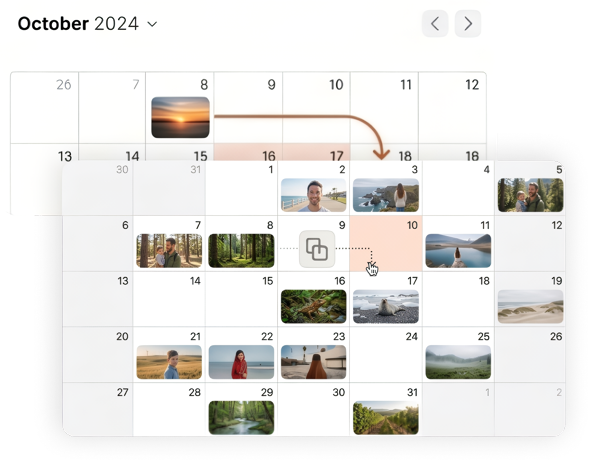
Content plan
Set up future publication schedules as calendar slots.
| ✔ | ✔ | ✔ |
Captions
Text templates for quick use in publications.
| ✔ | ✔ | ✔ |
Publication preview
See how a post looks in different social networks before publishing.
| ✔ | ✔ | ✔ |
Post views
Post calendar. Post feed. Post list. Grid view.
| ✔ | ✔ | ✔ |
Calendar notes
Mark important dates in the calendar so you don’t miss the next post.
| ✔ | ✔ | ✔ |
Hashtag templates
Add hashtags from templates.
| ✔ | ✔ | ✔ |
Image resize
Fit images to different formats
| ✔ | ✔ | ✔ |
Recurring publications
Automatically repeat publications on a schedule.
| ✔ | ✔ | ✔ |
Share a publication
Create a link to view/send a publication without signing in — useful for clients or colleagues.
| ✔ | ✔ | ✔ |
Post creation and edit history
See who on the team changed what in a post and when. Clear and simple.
| ✔ | ✔ | ✔ |
Tasks on a post
Assign a teammate a task on a specific post — clear who needs to do what and where.
| ✔ | ✔ | ✔ |
Content approval
Send content for review and publish it only after approval.
| — | ✔ | ✔ |
Post discussion
Discuss a post while creating it with teammates and clients. Write text, record voice notes, attach files and mention people for clear, fast communication.
| — | ✔ | ✔ |
Integrations
| |||
API
Integrate and exchange data with all social networks via official APIs.
| ✔ | ✔ | ✔ |
AI Assistant
| |||
AI tokens
Number of AI assistant tokens
| 2 000 tokens | 5 000 tokens | 20 000 tokens |
Automation and AI
| |||
Individual AI assistant settings
Set project context for AI. Tune AI to your brand and audience. SMM team AI will use your project settings and return the right result.
| ✔ | ✔ | ✔ |
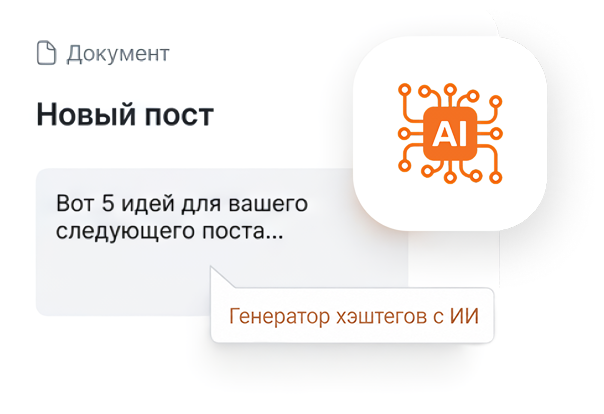
AI post text
Generate texts, titles and hashtags right while creating a post.
| ✔ | ✔ | ✔ |
Chat with AI Assistant
Write your request in free form and get a unique answer.
| ✔ | ✔ | ✔ |
Post ideas
Generate several ideas for topics you could write about.
| ✔ | ✔ | ✔ |
News hooks
Dates and holidays today, or in a specific month.
| ✔ | ✔ | ✔ |
Short video ideas
Trending ideas for short videos.
| ✔ | ✔ | ✔ |
Short video scripts
Create a detailed script for your clip.
| ✔ | ✔ | ✔ |
Create a content plan
Create a post plan on a specific topic.
| ✔ | ✔ | ✔ |
Quiz / poll
Create engaging polls to test your audience.
| ✔ | ✔ | ✔ |
File manager
| |||
File manager
Storage for files
| 10 GB | 20 GB | 50 GB |
Upload files
| ✔ | ✔ | ✔ |
Organize into folders and delete what you don’t need.
| ✔ | ✔ | ✔ |
Filter by date, name, content type.
| ✔ | ✔ | ✔ |
Project information
| |||
Project information
Keep all project information so everyone sees everything in one place.
| ✔ | ✔ | ✔ |
Open access to a specific card only for those who need it
| — | ✔ | ✔ |
Teamwork
| |||
Unlimited number of members in a project
| — | ✔ | ✔ |
Unlimited number of guests in a project
| — | ✔ | ✔ |
Discuss posts only with the team
| — | ✔ | ✔ |
Open only the needed projects to each team member
| — | ✔ | ✔ |
Enable only the needed modules for team members in a project
| — | ✔ | ✔ |
Configure individually what each person can do in a project
| — | ✔ | ✔ |
Invite a client with limited rights.
| — | ✔ | ✔ |
Incoming messages and comments
| |||
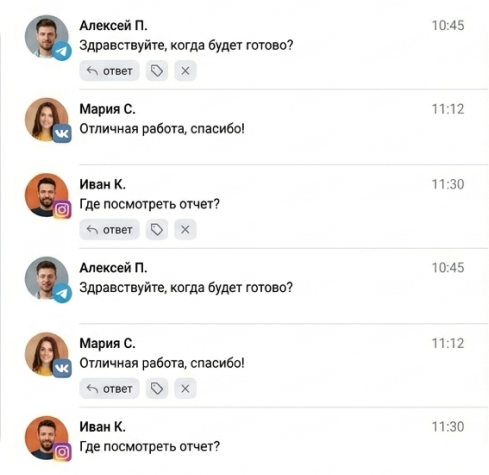
Inbox
A single section for comments and messages.
| ✔ | ✔ | ✔ |
Quick replies
Text templates for replies to comments and messages.
| ✔ | ✔ | ✔ |
Notifications
Notifications about new comments and messages in Telegram and email.
| ✔ | ✔ | ✔ |
User profile
Add labels. Write comments on a dialog, create tasks.
| ✔ | ✔ | ✔ |
Message statistics
Track how many messages were received, who replied, and response speed.
| ✔ | ✔ | ✔ |
Dialog delegation
Assign a dialog to a team member
| — | ✔ | ✔ |
AI reply assistant
SMM team AI assistant knows the project context and your offers and helps craft replies to users.
| — | ✔ | ✔ |
Tasks module
| |||
Kanban board
manage tasks by work stages
| ✔ | ✔ | ✔ |
Task list
structured list of all project tasks
| ✔ | ✔ | ✔ |
Task calendar
plan work by deadlines
| ✔ | ✔ | ✔ |
Drag and drop tasks
Drag tasks between columns and by dates in the calendar
| ✔ | ✔ | ✔ |
Tasks on a post
The task shows the related post. Clear, simple and fast.
| ✔ | ✔ | ✔ |
Voice description
Voice message in a task and in task discussions
| ✔ | ✔ | ✔ |
Deadlines
set and track deadlines
| ✔ | ✔ | ✔ |
Checklists
split a task into subtasks and track progress
| ✔ | ✔ | ✔ |
Comments
discuss a task within the team
| ✔ | ✔ | ✔ |
Attachments
files and work materials inside a task
| ✔ | ✔ | ✔ |
Labels
extra classification and grouping of tasks
| ✔ | ✔ | ✔ |
Filters
by status, deadline, assignee and labels
| ✔ | ✔ | ✔ |
Recurring tasks
automatically create regular tasks
| ✔ | ✔ | ✔ |
Progress control
show checklist completion
| ✔ | ✔ | ✔ |
Task work history
all information and communication in one place
| ✔ | ✔ | ✔ |
Assignee assignment
one or several participants
| — | ✔ | ✔ |
Participant mentions
A participant sees which task they were mentioned in and can filter their tasks
| — | ✔ | ✔ |
Graphic editor
| |||
Image editor
| ✔ | ✔ | ✔ |
Text and titles. Various fonts and styles
| ✔ | ✔ | ✔ |
Shapes and elements
| ✔ | ✔ | ✔ |
Stickers
| ✔ | ✔ | ✔ |
Free stock photos relevant to the project topic
| ✔ | ✔ | ✔ |
Free stock backgrounds for layouts
| ✔ | ✔ | ✔ |
Color and transparency settings
| ✔ | ✔ | ✔ |
Layers and positioning
| ✔ | ✔ | ✔ |
Resize. Ready social formats. Custom sizes
| ✔ | ✔ | ✔ |
Save to media library
| ✔ | ✔ | ✔ |
Download
| ✔ | ✔ | ✔ |
Add to a new post
| ✔ | ✔ | ✔ |
Prices
| |||
Price per workspace
| $19 | $39 | $59 |
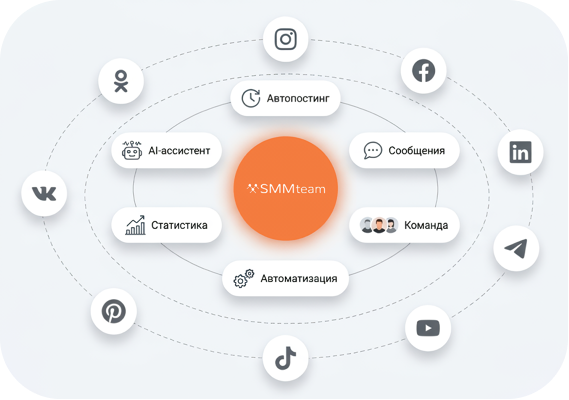
With SMM Team, you no longer need to jump between platforms. All social networks are connected, posts are planned and published from one place.

Plan and publish your content on 9 platforms
< 10h
From creation to approval of your posts
> 1%
Time saved on meetings and email
How it works
1
Connect your social media accounts
— all your social media pages under one panel.2
Add a team
- assign roles and permissions for the work project in a couple of clicks. Everything is simple and clear.3
Save project information
, so the whole team is informed and can access the information. Everything in one place, everyone understands. Set access boundaries and provide the necessary information only to the team members who need it.4
Set up a content plan
— create posts, add stories.5
Assign tasks to the team
and track the activity of all team members.6
Publish content and analyze results
— track statistics, audience engagement and the effectiveness of your posts in real time.Ready to speed up your social media work?
Platform capabilities for effective social media work
Discussion, approval and post approval
Content approval in social networks without chaos
Collaborative post discussion - comments and edits right in the post card.
Online editing in real time - the team sees changes, comments and edits immediately.
Approve and reject posts in one click - everything is simple and fast.
Share a post without registration - send a link to a client, manager or contractor. All their comments will appear to you in real time.
Edit history - all correspondence, comments and changes are saved.
Convenient for agencies, companies and freelancers.